x2c is a language for people who love to code.
Every programming language is built around a few values that determine what is easy or awkward to express. Python values readability and comes with batteries included. C values a small and fast mapping to the machine. Lisp values code and data being the same. Languages are opinionated because their goals conflict, and each one picks its priorities.
x2c is a quirky little language that would rather not pick. Static or dynamic, mutable or immutable, compile-time or run-time, managed or unmanaged: every option stays available. x2c is picky about one thing only, which is that it all stays one small language. The same code works in every mode, from single bits up to whole systems. You can change your mind or your paradigm without changing languages.
All of which makes x2c sound like a language with no values. It has three: love, power, and magic, and we know how that sounds. Nonetheless, see the panel for the values translated into code.
Under the hood, x2c is a superset of C that compiles to C, so everything stays close to native representations and works with the entire C ecosystem. If you know C, you already write x2c.
Why bother? Because programming is not about making computers do things; it is about helping brains think things, and x2c is a language for thinking in code.
Some users report heightened expressiveness, a sense of universality, and a touch of transcendence. Be sure to drink plenty of water.
Code is Love
Simple things are simple. Work with values, text, and collections directly. Read a file, walk its contents, and keep temporary memory scoped to the work that needs it. Skip the parts you hate; focus on what you love: the actual ideas.
More in the docs: values, symbols, collections and literals, files, and methods.
Code is Power
Complex things are possible. Your types, collection operations, patterns, packages, and threads work together. The pieces are small, but they compose and compound. Each piece you add gives your code more power.
More in the docs: collections, iteration, scopes, match, threads, exceptions, and packages.
Code is Magic
Keep the values. Change how you program. Evaluate Lisp alongside compiled code, use macros to generate repeated definitions, and add constructs that fit your problem. One language. One data model. New ways to program.
More in the docs: protocols, macros and meta functions, runtime Lisp, self-hosting, compiler inspection, and architecture.
Install x2c
x2c is experimental. Expect changes between releases.
Platforms. macOS 15 or later (arm64, x86_64); Linux with glibc 2.38 or later on x86_64 or arm64 (aarch64); Windows through WSL2.
curl -fsSL https://x2c-lang.dev/install.sh | sh
export PATH="$HOME/.local/x2c/bin:$PATH"
x2c run ~/.local/x2c/examples/foreach.x
Install native binaries. One command downloads the compiler, runtime, headers, and examples for your platform into ~/.local/x2c. The installer needs a C compiler named cc. See the package installation instructions to add packages. The release notes list what changed and how to upgrade.
Or build from source. Follow the source installation instructions to build a checkout and install x2c into your home directory.
Put packages to work
Draw a chart, build a desktop or terminal app, query data, or train a model. Below is one working example from each of ten packages, with code, its result, and the complete source and setup instructions.
Packages give libraries their own namespaces, so you can use them together without name collisions. Build once, then import by name. Shims and adapters add idiomatic x2c types and methods while keeping the native API available; Lisp bindings and decorators can extend the language itself.
Browse packages or learn how to import one.
# From your x2c checkout
make build-safe
./configure --packages raylib

make -C packages/raylib short-example
cd packages/raylib
./builds/climate-trends
# Result: builds/climate-trends.png
Packages need their native libraries prepared first. Release bundles cover macOS and Linux on arm64 and x86_64; torch bundles cover macOS arm64 and Linux x86_64 only. raylib, SQLite, and x2cui have no release bundle and build from a source checkout.
import "raylib";

Image chart = Image.new(2160, 960, paper);
defer chart.free();
// ... draw the title and the temperature grid ...
Vector2 origin = { 84, 252 }, previous = { 0 };
int index = 0;
foreach (int high, highs) {
  Vector2 offset = { index * 94, -(high - 60) * 6 };
  Vector2 point = origin + offset;
  if (index) {
    // ... fill the area below the segment ...
    chart.draw_line(previous.scale(3), point.scale(3), 9, teal);
  }
  previous = point;
  index++;
}

// ... draw labels with the bundled TrueType font ...
chart.resize(1440, 640);
chart.export(output);
Plot twist.
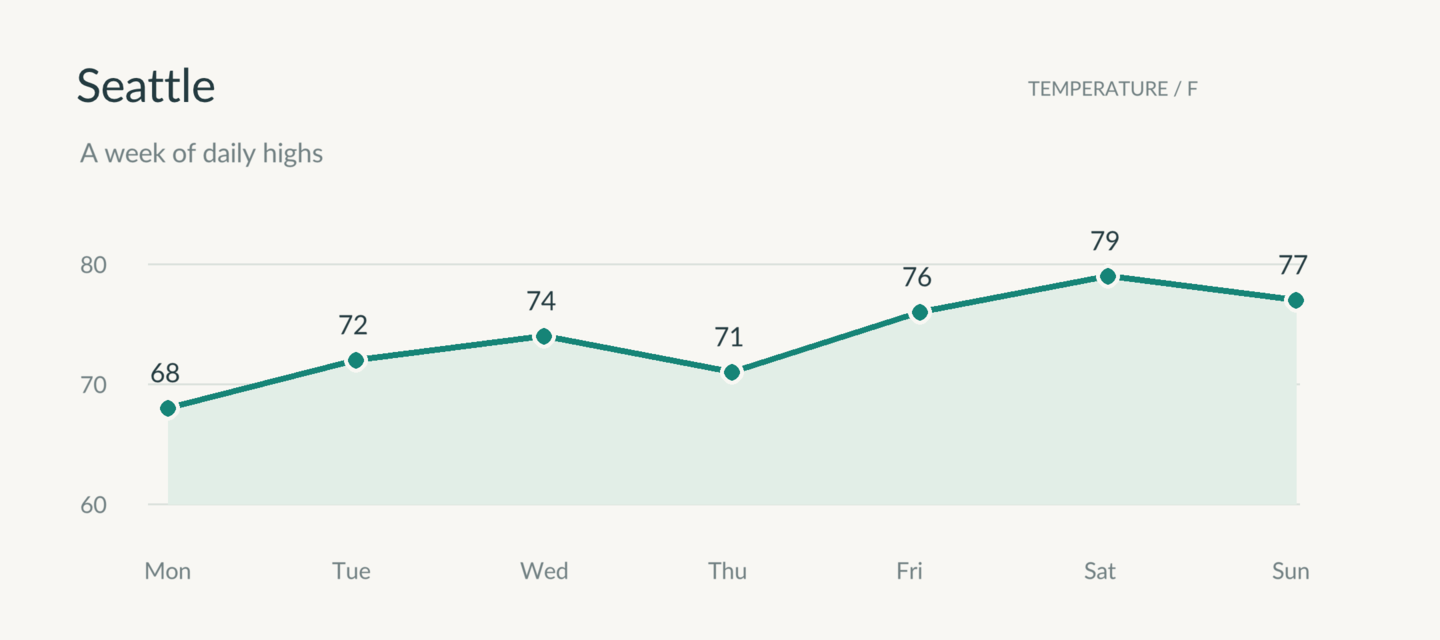
Turn seven daily temperatures into a PNG with ordinary vectors, Lists, and drawing methods. Each temperature becomes a point; lines join the points over a pale filled area, and labels mark the days and highs. The complete program draws this chart into an image and exports it as a PNG. It initializes a small window before loading the font.
raylib has no release bundle. Build it from a checkout with
make -C packages/raylib run.
import "termbox2" with Termbox;

static void _draw(Termbox terminal, ArrayChar cells,
                  int width, int height) {
  terminal.clear();
  for (int y = 0; y < height; y++)
    for (int x = 0; x < width; x++) {
      if (!cells[y * width + x])
        continue;
      int run = 1;
      while (x + run < width && cells[y * width + x + run])
        run++;
      terminal.fill(x, y, run, 1, "#",
                    TB_GREEN | TB_BOLD, TB_DEFAULT);
      x += run - 1;
    }
  terminal.present();
}
Terminal velocity.
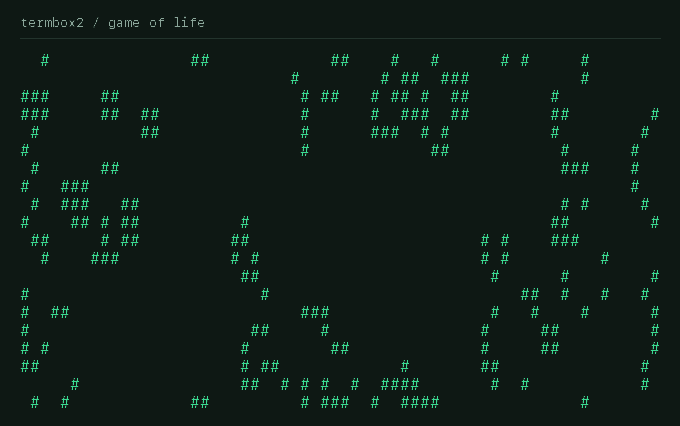
Conway’s Game of Life fills the terminal with a changing world. The drawing function paints adjacent living cells in one call, then presents the frame. The complete program starts with random cells, advances each generation, handles resizing, and exits on a keypress.
import "x2cui" with App, Offscreen, TextField, Ui;

ui.table ("orders", sort: &s.sort, selectable: true,
          columns: {"Order": 90, "Customer": fill,
                    "Date": unsorted(90), "Status": 120,
                    "Amount": right(110)})
ui.each (Order o in shown, key: o.id)
ui.table_row (row, selected: s.selected == o) {
  if (row.clicked)
    s.selected = o;

  ui.cell_text(o.id);
  ui.cell () {
    ui.avatar(o.customer, size: 28);
    ui.column (gap: 0, width: fill) {
      ui.text(o.customer, font: medium, nowrap: true);
      ui.text(o.email, size: 12,
              color: text_secondary, nowrap: true);
    }
  }

  ui.cell_text(o.date);
  ui.cell ()
    ui.badge(o.status, tone: o.tone, dot: true);
  ui.cell_text(o.price);
}
UI complete me.
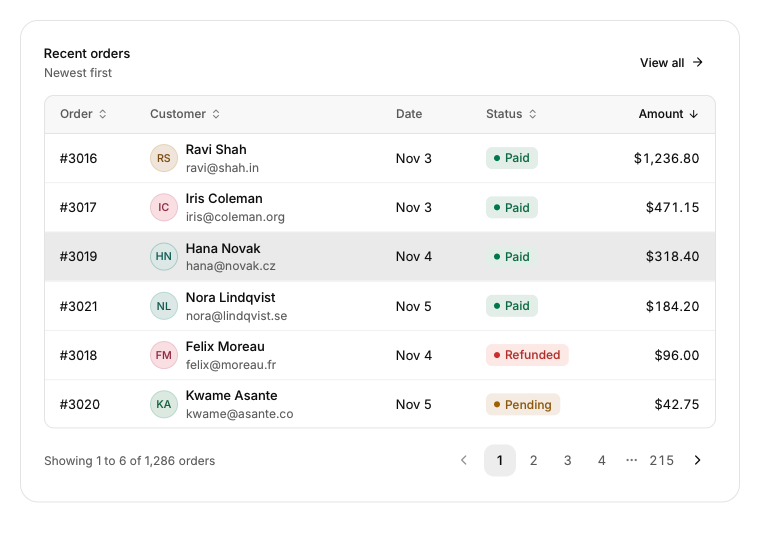
x2cui provides an x2c interface to CUI’s drawn components. Define table columns with a Map, then compose each row from text, avatars, and badges. The complete orders example sorts columns, selects rows, and draws pagination. This image comes from its off-screen renderer.
The package is experimental and source-only.
Go further.
About x2c tells its story. Read the docs to learn the language and look up its library. Browse the source to see how it works or make it your own.
Repository counts from make stats.
code / comment lines in the core compiler.
code / comment lines in the library source.
10 command programs, including build/run, lint, graph analysis, and language server.
14 components implementing language features with macros and rewrite rules. Code / comment lines.
unit tests.
compiler fixtures.
showcase examples.
integrations with working examples.